Vendor Name not showing in Device Manager

Moderator: AdminGroup

krixx
Posts: 12
Joined: Mon Sep 19, 2022 20:15
Has thanked: 3 times
Been thanked: 5 times

Vendor Name not showing in Device Manager

Postby krixx » Sat Mar 16, 2024 11:34

Hi, I can see my controllers clearly by name in VKB Device Config
Screenshot 2024-03-16 103002.png

And in Devices and Printers
Screenshot 2024-03-16 103110.png
Screenshot 2024-03-16 103110.png (14.2 KiB) Viewed 8852 times

USBLogView shows no Vendor Name when plugging them in or out
Screenshot 2024-03-16 103158.png

And in Device Manager all I see is a bunch of HID devices
Screenshot 2024-03-16 103340.png


How do I get the correct Vendor Name and type in my device manager list?
Thanks!

krixx
Posts: 12
Joined: Mon Sep 19, 2022 20:15
Has thanked: 3 times
Been thanked: 5 times

Re: Vendor Name not showing in Device Manager

Postby krixx » Sun Jun 23, 2024 23:14

bump

patrick1978
Posts: 13
Joined: Sat Jul 11, 2020 18:45
Has thanked: 1 time
Been thanked: 3 times

Re: Vendor Name not showing in Device Manager

Postby patrick1978 » Thu Jun 27, 2024 5:56

The names that show up in the device manager are from the inf file that was used to install the drivers for that device.

Since VKB controllers just use the generic windows controller drivers they are named as such.

It may be possible to create a dummy inf file that will give it it's proper name in the device manager but I believe that would also require creating digital signature cat file so window will trust the driver install. So a lot of work just to have the name in the device manager.

Or maybe adding the name in the registry if you could find the right key to edit.

krixx
Posts: 12
Joined: Mon Sep 19, 2022 20:15
Has thanked: 3 times
Been thanked: 5 times

Re: Vendor Name not showing in Device Manager

Postby krixx » Sun Jan 18, 2026 8:20

Can this not be done by VKB?

User avatar
Alex Oz
Posts: 1367
Joined: Mon May 12, 2008 9:10
Location: Минск
Has thanked: 38 times
Been thanked: 165 times

Re: Vendor Name not showing in Device Manager

Postby Alex Oz » Sun Jan 18, 2026 22:23

Changing the OEM name of the joystick is possible ( Game Controllers WIN app as an example ).
Изображение из буфера обмена (1).jpg


Taking into account the expected connections of NXT modules to the BlackBox, the total number of devices subject to certification for the driver will be many hundreds. This is unrealistic.
input.inf contains almost nothing from real joysticks - other devices must be described by their own driver package.
Изображение из буфера обмена (2).jpg
Крайние прошивки и софт / Latest firmware & software
https://www.njoy32.vkb-sim.pro/home
http://alex-oz.strana.de

krixx
Posts: 12
Joined: Mon Sep 19, 2022 20:15
Has thanked: 3 times
Been thanked: 5 times

Re: Vendor Name not showing in Device Manager

Postby krixx » Mon Jan 19, 2026 8:38

Thanks, Alex.

The names show up fine in the Game Controllers list
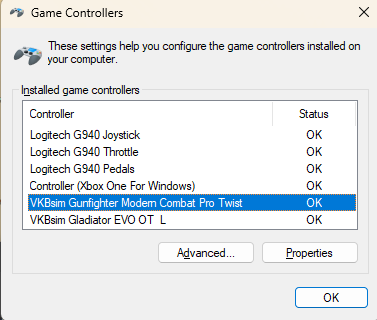
Screenshot 2026-01-19 072911.png
Screenshot 2026-01-19 072911.png (16.68 KiB) Viewed 5486 times


But not in the Device Manager - and so also not in device descriptions for binding files in Elite Dangerous. And there the Device name is set by combining the USB VendorID with the Device ID (which I can find in Show_HID.exe). The problem is that the DeviceID changes from time to time (especially after a firmware update).

So I understand that I would need a VKB driver, which would be a wrapper around the standard Windows driver with an inf file with the DeviceDesc in it to do this?
I can't find such a file on https://www.vkbcontrollers.com/pages/downloads , maybe I am missing something?

User avatar
Alex Oz
Posts: 1367
Joined: Mon May 12, 2008 9:10
Location: Минск
Has thanked: 38 times
Been thanked: 165 times

Re: Vendor Name not showing in Device Manager

Postby Alex Oz » Mon Jan 19, 2026 10:08

yes, but such drivers do not exist - because the standard one is used
Крайние прошивки и софт / Latest firmware & software
https://www.njoy32.vkb-sim.pro/home
http://alex-oz.strana.de


Return to “Technical Support”

Who is online

Users browsing this forum: No registered users and 89 guests