Firstly:
http://forum.vkb-sim.pro/viewtopic.php?f=25&t=8624
(update device / configurator)
https://www.njoy32.vkb-sim.pro/home
Bind X and Y AXES TO WASD keys
Moderator: AdminGroup
-
Alex Oz

- Posts: 1371
- Joined: Mon May 12, 2008 9:10
- Location: Минск
- Has thanked: 38 times
- Been thanked: 168 times
Re: Bind X and Y AXES TO WASD keys
Крайние прошивки и софт / Latest firmware & software
https://www.njoy32.vkb-sim.pro/home
http://alex-oz.strana.de
https://www.njoy32.vkb-sim.pro/home
http://alex-oz.strana.de
Re: Bind X and Y AXES TO WASD keys
Hi Alex Oz,
LOL sorry about the low effort info in my original post. I grabbed the latest configurator from your links.
Note: when opening up a text editor and testing this, and throwing from center to +X and back to center, I get this output: sdwaawds
When throwing from center to -X and back to center, I get this output: ss
Y axes has no output.
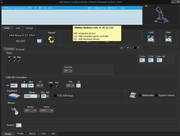
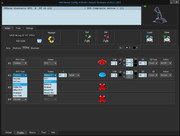
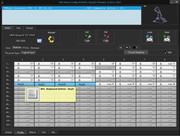
I appreciate the help
LOL sorry about the low effort info in my original post. I grabbed the latest configurator from your links.
Note: when opening up a text editor and testing this, and throwing from center to +X and back to center, I get this output: sdwaawds
When throwing from center to -X and back to center, I get this output: ss
Y axes has no output.
I appreciate the help
-
Alex Oz
- Posts: 1371
- Joined: Mon May 12, 2008 9:10
- Location: Минск
- Has thanked: 38 times
- Been thanked: 168 times
Re: Bind X and Y AXES TO WASD keys
Крайние прошивки и софт / Latest firmware & software
https://www.njoy32.vkb-sim.pro/home
http://alex-oz.strana.de
https://www.njoy32.vkb-sim.pro/home
http://alex-oz.strana.de
Re: Bind X and Y AXES TO WASD keys
Hi Alex Oz,
Thank you for the quick replies! The fw update did the trick. Now the XY is good to go with WASD. I'm going to test this out in a few games and see if its all good.
Thanks again for the quick service Edit: So Yes, everything is great, totally functions as expected in fps games!
Side Note: In BATTLEFIELD 6, I had the pinky button bound to a keyboard key for in game "Zoom/ADS" (the in game default for this is R-Mouse). I went in and used pinky to zoom and there is a bug that causes the view to jitter in and out of zoom, which makes it function ON/OFF rapidly. -I looked that up online and found that its a known bug in the game code for YEARS. The bug typically happens when Users have mixed inputs, specifically using a mouse and controller for the same button function.
Also: It does not help if you go into the game and unbind the R-Mouse from zoom/ads (the bug still occurs). So I went into vkb config and turned on virtual mouse & rebound the pinky to R-Mouse, went into the game and it works FLAWLESSLY now.
Thank you for the quick replies! The fw update did the trick. Now the XY is good to go with WASD. I'm going to test this out in a few games and see if its all good.
Thanks again for the quick service
Edit: So Yes, everything is great, totally functions as expected in fps games! Side Note: In BATTLEFIELD 6, I had the pinky button bound to a keyboard key for in game "Zoom/ADS" (the in game default for this is R-Mouse). I went in and used pinky to zoom and there is a bug that causes the view to jitter in and out of zoom, which makes it function ON/OFF rapidly. -I looked that up online and found that its a known bug in the game code for YEARS. The bug typically happens when Users have mixed inputs, specifically using a mouse and controller for the same button function.
Also: It does not help if you go into the game and unbind the R-Mouse from zoom/ads (the bug still occurs). So I went into vkb config and turned on virtual mouse & rebound the pinky to R-Mouse, went into the game and it works FLAWLESSLY now.
-
Alex Oz
- Posts: 1371
- Joined: Mon May 12, 2008 9:10
- Location: Минск
- Has thanked: 38 times
- Been thanked: 168 times
Re: Bind X and Y AXES TO WASD keys
That's great.
Could you please attach your BF6 profile to the archive?
By the way, the new software will allow you to quickly switch between joystick profiles without constantly rewriting them to the controller.
https://www-njoy32-vkb--sim-pro.translate.goog/home/multidevice?_x_tr_sl=ru&_x_tr_tl=en&_x_tr_hl=ru&_x_tr_pto=wapp
Could you please attach your BF6 profile to the archive?
By the way, the new software will allow you to quickly switch between joystick profiles without constantly rewriting them to the controller.
https://www-njoy32-vkb--sim-pro.translate.goog/home/multidevice?_x_tr_sl=ru&_x_tr_tl=en&_x_tr_hl=ru&_x_tr_pto=wapp
Крайние прошивки и софт / Latest firmware & software
https://www.njoy32.vkb-sim.pro/home
http://alex-oz.strana.de
https://www.njoy32.vkb-sim.pro/home
http://alex-oz.strana.de
Re: Bind X and Y AXES TO WASD keys
Hi All,
If necessary, ill ask this in a new thread...
TLDR/short version: With Axis bound to WASD and DzLo set to 0, I still have a deadzone in some games like COD BO7 and the deadzone is also confirmed in notepad. The stick needs to be pushed approx half way in any direction before the input occurs.
As stated above, I got my NXT Evo premium to work flawlessly in FPS games with axis mapped to keys etc. My current question is about deadzones. I changed my primary axis dzlo's from the stock 3% to 0 (in Profile>Axis>Physical Axis>Dz Lo), and when I test it with notepad, the axis outputs WASD at the same throw distance as it did before I changed the deadzone. Even, In the game (Call of Duty Black Ops 7), the throw distance is still the same I think. However, the response time is NOTICEABLY faster, and the movement is way more fluid (this is what I wanted). It "feels" very close to analog or keyboard movement now with the dzlo at 0. I can jitter left/right WAY faster, and I can pull trick movements, like changing directions during sprints and slides without losing momentum. I could NOT do this when the dz was 3% or higher. To change directions in a slide or sprinting with 3% or higher dzlo, my character would respond slower, (like I was going through the deadzone and it was almost resetting the momentum down) it made it so if I had to change directions without a delay, I had to do that by using mouse look (change my reticle/aim view with my mouse and not the joystick/-just keep the joy on forward and "look" to the direction I wanted to change to). Now I can do any directional changes with just the stick and its not preventing me from looking/aiming where I want to, and now I don't lose any momentum/movement speed.
With that explanation out of the way:
1. Is that throw distance a mechanical deadzone that the gimbal or dry clutches must go through, -or can I do something to make that throw shorter then it already is?
2. What does Dz Hi do? I changed it from 1 to 0 and tested it in game and cant see or "feel" a diff. Note: I have the game setup where its on automatic sprint, so you get to full sprint speed throwing the stick in any direction, instantly. I assumed the Dz Hi designated the outer edge, where you get maximum response with game input, -but maybe that doesn't even matter when I have this game only set to sprint, because there is really no speed difference or curves in the game?
BTW, I really love the gladiator! I've used a trackball/joystick combo exclusively for FPS games since 1996, and gone through MANY different sticks (7 modded Panther XL's, CH Fighterstick, Thrustmaster Warthog etc.). The Evo is by FAR the most usable for FPS games that I've owned. Even way higher price point sticks don't have the flexibility the Evo has (looking at you Thrustmaster & Virpil), because as people have stated in this thread, many modern FPS games have cheat detection that prevents the User from running keyboard mapping or emulation software, and many of these have response rates 250hz or lower & don't have magnetic sensors and other options that mitigate problems with stick drift etc...
Anyhoo, thank you for the help!
If necessary, ill ask this in a new thread...
TLDR/short version: With Axis bound to WASD and DzLo set to 0, I still have a deadzone in some games like COD BO7 and the deadzone is also confirmed in notepad. The stick needs to be pushed approx half way in any direction before the input occurs.
As stated above, I got my NXT Evo premium to work flawlessly in FPS games with axis mapped to keys etc. My current question is about deadzones. I changed my primary axis dzlo's from the stock 3% to 0 (in Profile>Axis>Physical Axis>Dz Lo), and when I test it with notepad, the axis outputs WASD at the same throw distance as it did before I changed the deadzone. Even, In the game (Call of Duty Black Ops 7), the throw distance is still the same I think. However, the response time is NOTICEABLY faster, and the movement is way more fluid (this is what I wanted). It "feels" very close to analog or keyboard movement now with the dzlo at 0. I can jitter left/right WAY faster, and I can pull trick movements, like changing directions during sprints and slides without losing momentum. I could NOT do this when the dz was 3% or higher. To change directions in a slide or sprinting with 3% or higher dzlo, my character would respond slower, (like I was going through the deadzone and it was almost resetting the momentum down) it made it so if I had to change directions without a delay, I had to do that by using mouse look (change my reticle/aim view with my mouse and not the joystick/-just keep the joy on forward and "look" to the direction I wanted to change to). Now I can do any directional changes with just the stick and its not preventing me from looking/aiming where I want to, and now I don't lose any momentum/movement speed.
With that explanation out of the way:
1. Is that throw distance a mechanical deadzone that the gimbal or dry clutches must go through, -or can I do something to make that throw shorter then it already is?
2. What does Dz Hi do? I changed it from 1 to 0 and tested it in game and cant see or "feel" a diff. Note: I have the game setup where its on automatic sprint, so you get to full sprint speed throwing the stick in any direction, instantly. I assumed the Dz Hi designated the outer edge, where you get maximum response with game input, -but maybe that doesn't even matter when I have this game only set to sprint, because there is really no speed difference or curves in the game?
BTW, I really love the gladiator! I've used a trackball/joystick combo exclusively for FPS games since 1996, and gone through MANY different sticks (7 modded Panther XL's, CH Fighterstick, Thrustmaster Warthog etc.). The Evo is by FAR the most usable for FPS games that I've owned. Even way higher price point sticks don't have the flexibility the Evo has (looking at you Thrustmaster & Virpil), because as people have stated in this thread, many modern FPS games have cheat detection that prevents the User from running keyboard mapping or emulation software, and many of these have response rates 250hz or lower & don't have magnetic sensors and other options that mitigate problems with stick drift etc...
Anyhoo, thank you for the help!
Last edited by Seany_Vee on Sun Feb 15, 2026 11:14, edited 1 time in total.
Re: Bind X and Y AXES TO WASD keys
Seany_Vee wrote:With that explanation out of the way:
1. Is that throw distance a mechanical deadzone that the gimbal or dry clutches must go through, -or can I do something to make that throw shorter then it already is?
With 0% dzlo there is no deadzone in t he middle. Whatever delay remains in the activation of your keys will be down to your implementation.
The best would be to save your config to a .cfg file in VKBDevcfg and post a link to it here.
2. What does Dz Hi do? I changed it from 1 to 0 and tested it in game and cant see or "feel" a diff. Note: I have the game setup where its on automatic sprint, so you get to full sprint speed throwing the stick in any direction, instantly. I assumed the Dz Hi designated the outer edge, where you get maximum response with game input, -but maybe that doesn't even matter when I have this game only set to sprint, because there is really no speed difference or curves in the game?
DzHi is the deadzone around the edges (just like dzlo is the deadzone around the center).
Re: Bind X and Y AXES TO WASD keys
Hi Jukelo,
The cfg link: https://www.mediafire.com/file/1wlhe1uw3pdyxib/VKBsim_Gladiator_EVO_R_profile_3.cfg/file
Tested with the following results:
1. In windows game controller>properties: this controller functions without any deadzone (you can see per-pixel movements of the axis while testing)
2. In Battlefield 6: Again, there is no deadzone when moving the stick. If you move it in the slightest bit, you walk, push a little further, you run (functions as expected with zero deadzone)
3. In Call of Duty Black Ops 7, and also when testing axis mapped to WASD in notepad: Input does not happen until I push the stick close to half way to the outer edge (any direction)
I find it weird that in notepad it has a sizeable deadzone, but in Battlefield 6, there is Zero deadzone, and in that game, the axis are mapped to WASD...
I'm trying to get rid of the deadzone, -maybe using AntiDZ? -Added screenshots
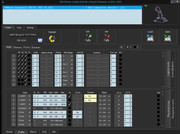
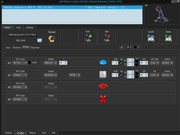
UPDATE, I think I got what I'm looking for: I noticed on my 2nd screenshot (profile>action tab) there is a DZ setting in that menu as well. I set that from 50 to 20 (from what I can tell, 20 is the lowest I can set that to here) -That dramatically lowered the physical deadzone. Now I get inputs in notepad and the game with a very small movement of the stick.
Question: Is there a way to get this down to 10 or lower? And what DZ type (cross or circle) would you suggest for FPS games?
2nd UPDATE: In case anyone reads this and wants to know about DZ Type in FPS games -Both function well, but Cross inputs to the AXIS/WASD keys, even on diagonals. Circle is more fluid as it inputs diagonals as well (so if you push North-East, it inputs both bound keys like WDWDWD etc.) -So I went with Circle
The cfg link: https://www.mediafire.com/file/1wlhe1uw3pdyxib/VKBsim_Gladiator_EVO_R_profile_3.cfg/file
Tested with the following results:
1. In windows game controller>properties: this controller functions without any deadzone (you can see per-pixel movements of the axis while testing)
2. In Battlefield 6: Again, there is no deadzone when moving the stick. If you move it in the slightest bit, you walk, push a little further, you run (functions as expected with zero deadzone)
3. In Call of Duty Black Ops 7, and also when testing axis mapped to WASD in notepad: Input does not happen until I push the stick close to half way to the outer edge (any direction)
I find it weird that in notepad it has a sizeable deadzone, but in Battlefield 6, there is Zero deadzone, and in that game, the axis are mapped to WASD...
I'm trying to get rid of the deadzone, -maybe using AntiDZ? -Added screenshots
UPDATE, I think I got what I'm looking for: I noticed on my 2nd screenshot (profile>action tab) there is a DZ setting in that menu as well. I set that from 50 to 20 (from what I can tell, 20 is the lowest I can set that to here) -That dramatically lowered the physical deadzone. Now I get inputs in notepad and the game with a very small movement of the stick.
Question: Is there a way to get this down to 10 or lower? And what DZ type (cross or circle) would you suggest for FPS games?
2nd UPDATE: In case anyone reads this and wants to know about DZ Type in FPS games -Both function well, but Cross inputs to the AXIS/WASD keys, even on diagonals. Circle is more fluid as it inputs diagonals as well (so if you push North-East, it inputs both bound keys like WDWDWD etc.) -So I went with Circle
Who is online
Users browsing this forum: No registered users and 43 guests